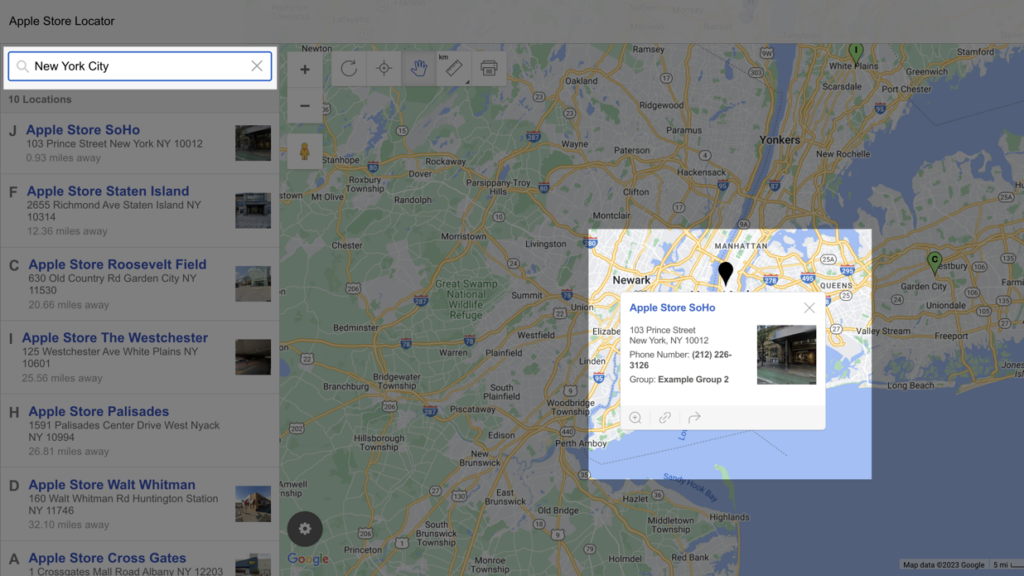
Store Locator Creator using BatchGeo

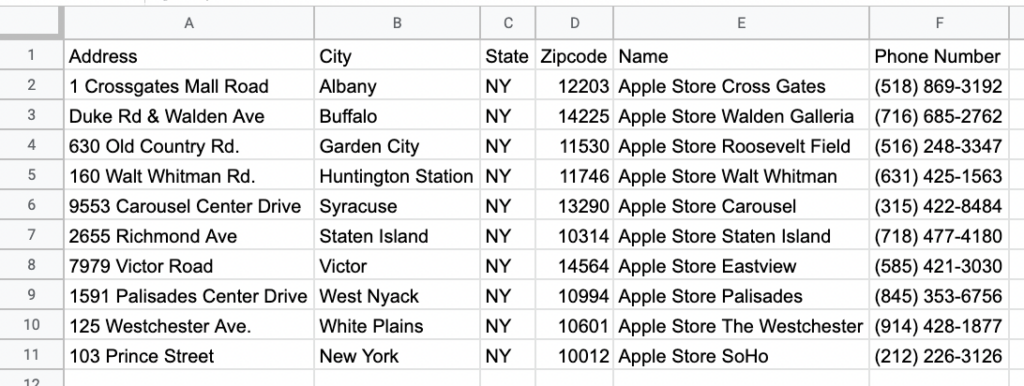
You can now create a locator for multiple locations of a store front, business, office (or anything for that matter) for your website using BatchGeo.

Here is some simple HTML you can add to your website to find the closest location on your map to the users address. Just replace the value=”592e382d1c8aa6b2e50ca5fb376967a1″ with the URL alias of your map. This example is for the map at http://www.batchgeocode.com/map/592e382d1c8aa6b2e50ca5fb376967a1

<form action=”http://www.batchgeocode.com/map/”>
<input type=”hidden” name=”i” value=”592e382d1c8aa6b2e50ca5fb376967a1″>
<label>Search for nearest location<input type=”text” name=”q” value=”"></label>
<input type=”submit” value=”Search”>
</form>

Try it:

Search for nearest location

Another way to use this is by linking it:
http://www.batchgeocode.com/map/?i=592e382d1c8aa6b2e50ca5fb376967a1&q=Newark,NJ


27 Responses to “Store Locator Creator using BatchGeo”

  1. Andrea says:

    Help
    i go to all of the McDonalds on a regular basis for service in ohio
    is there a way to just map this
    i need it in easy steps

  2. Yehuda says:

    i've set a branch locator up, but it seems to have a problem. it's not always sending me to the closest branch.

    branch finder is at http://www.stopsmoking.coop/frames/location.htm and when searching for post code m25 0hu it sends me past about 20 branches to one 200 miles away. it does the same with m8 4hu, m7 4we, and m25 0js. when i tried ha8 8xx, which is a different city, it got it right.

    anybody know why?

    yehuda brynin
    yehuda@brynin.com

  3. pkh says:

    Seems to be some issues in UK when using just postal code, but when using exact address or City it works okay. I will take a look…

  4. Yehuda Brynin says:

    Thanx. Please let me know. Btw, great job. This is far easier than any other store locator I have tried. If the problem is fixed, and I am able to use this for my website, I will gladly donate to this amazing project.

    Yehuda Brynin
    yehuda@brynin.com

  5. bobysblog says:

    PKH,

    This is bobysblog again. I just wanted to follow up on my question from earlier.

    Is there a way for a KML file created from BatchGeocode to tell Google Maps which color/shape of place marker to spit out? I have uploaded multiple maps using this tool, but they're all coming out as blue "targets" with a black dot in the middle. I would prefer to be able to tell Google Maps to make Map1 come out as yellow targets with dots, and for Map2 to come out as blue push-pins.

    Is there any way to do this?

    Thanks for your help,
    Nick

  6. Anonymous says:

    Help :)

    I need to be able to map multiple locations by county. If i include county name in my data, will the store locator feature allow me to retrieve all locations in a county on one map? Great tool!

  7. Anonymous says:

    Great map, but when I search for results they only show up as "Point B" instead of displaying all of the store information. Is there a way for search results to display the same information as when I click on the standard map?

  8. pkh says:

    Okay got that fixed, it will show the custom marker for the end location and popup the info window for it.

  9. Yehuda Brynin says:

    the issue of UK post codes seemed to be fixed for a few days, but once again it's sending me over 150 miles further than neccessary (completely ignoring at least 30 of my addresses in between)

    my map is at http://www.stopsmoking.coop/frames/location.htm

    try searching by post code m25 0ht

  10. Yehuda Brynin says:

    i like that it now opens the baloon with information for that store, however is it possible for it to open a new page next to the map?

  11. pkh says:

    Yehuda -
    I think I finally figured it out, give it a try now.

    On your feature request about opening up the page next to the map, not sure what you mean there…

  12. Yehuda Brynin says:

    slight problem. when i put in the post code m25 0ht (with a break in it) it takes me to the m25 moterway. when i try m250ht (without a break) it takes me to a road half a mile away which has a different post code.

    try it out to see my problem
    http://www.stopsmoking.coop/frames/location.htm

  13. Your post is neat. There are some issues here but don’t have the time right now. I’m bookmarking this and leave this post to check again later and update my primary comment (this one). By the way i found your blog post as i was quering for similar subjects in Google

  14. chris says:

    Great tool!! I’ve been looking for something like this for awhile as I pull my hair out trying to understand KML. I have one suggestion or maybe I just don’t know how to do this. When creating a Google Earth kml file I am unable to group locations and have them color coded as I am when saving a Google Map. This feature would be very useful as I am trying to group locations by date and it makes it easier to see where I have been on a particular day if the locations are color coded.

    Thanks Again for your hard work!

  15. cel says:

    this is awesome and so easy to use. But is there a way to not make it show the directions in the results page but instead show a list of stores that is close by (if search postcode/suburb) or list of stores that have the searched keyword?

    Keep up the good work!

  16. kyle says:

    Is there a modified code available that allows me to see the top 5 or top ten closest results? I am trying to create a 3D map of dealers so i can choose who i want to bid/give a particular project to.

    Thanks
    This stuff looks amazing i cannot wait to use it.
    If I can, I am gonna tell my boss it costs money to use and get Geobatch a donation for you :D

  17. marcos says:

    hi,

    you should have an option to remove your logo from the top of the map, charge a small fee and maybe you could see some revenue from it. i would pay for that feature. this way the map is clean.

  18. LOVE THIS says:

    I’m trying to import a sales list into my gps and think this will work. So far so good! Thanks
    I’m also going to tell my Boss this cost money when he asks me how I programmed my gps.

  19. David says:

    I would like to have the map not jump out of my website when the user searches for a location in the store locator.

    I would like to have an options to see the closest 5 results to my search location.

    Also, is there an option to turn off the driving directions if I want a clean map with just points.

    Thank you for all your help. I do find this to be an awesome tool.

  20. rob says:

    How do I change the marker to have a field name (like store number) instead of a dot?

  21. Kristen says:

    I am trying to map out the best route for almost 90 different locations, which is the best route to take, I have to make annual visits to each of these sites and want to be able to map out every location and the best/fastest route going from location to location, is this possible??

    Thank you

  22. Sam says:

    Hi,

    i want to create a store locator on my website. i have the addresses of the stores but i need the co-ordinates. Is there a way to achieve this?

    Rgds

  23. Cavan says:

    I’m also wondering how to change the marker to a field name (address, name…) rather than the dot. I need to print the maps but it won’t be any good because I can’t tell what is what.

    Thanks, this is a great tool!

  24. admin says:

    Yes just use our tool at http://batchgeo.com

  25. alan says:

    Hi i am planning to use this feature in my site, but I have a question, when implementing this into my site is it possible to place the map under the search box in the same page, so for everything to happen within the same page?

    Cheers

  26. alan says:

    also forgot to mention: the reason why i asked my above question is lets say if a person search for a location and wanted to search for another location, in this case having seen the above tutorial it means they would have to click back to make another search, would be nice to have the search result and map just under the search box…

  27. GTG says:

    I want to include the website of each location in the store locator. If I enter the column header in my spreadsheet as “website”, it shows up as a piece of information but you cannot click on it.

    If I title the column “URL”, then the store name becomes active as the link to the website. But then you cannot click on it for directions because it redirects you to the website of the business.

    Is there a way to make the website link active while maintaining the mapping feature when you click on store name? Maybe I have not set a column header or validator option correctly.

Leave a Reply