Batch Geocoding Just Got Smarter: Inside Google’s New “Last-Meter” Update
Published April 17, 2026
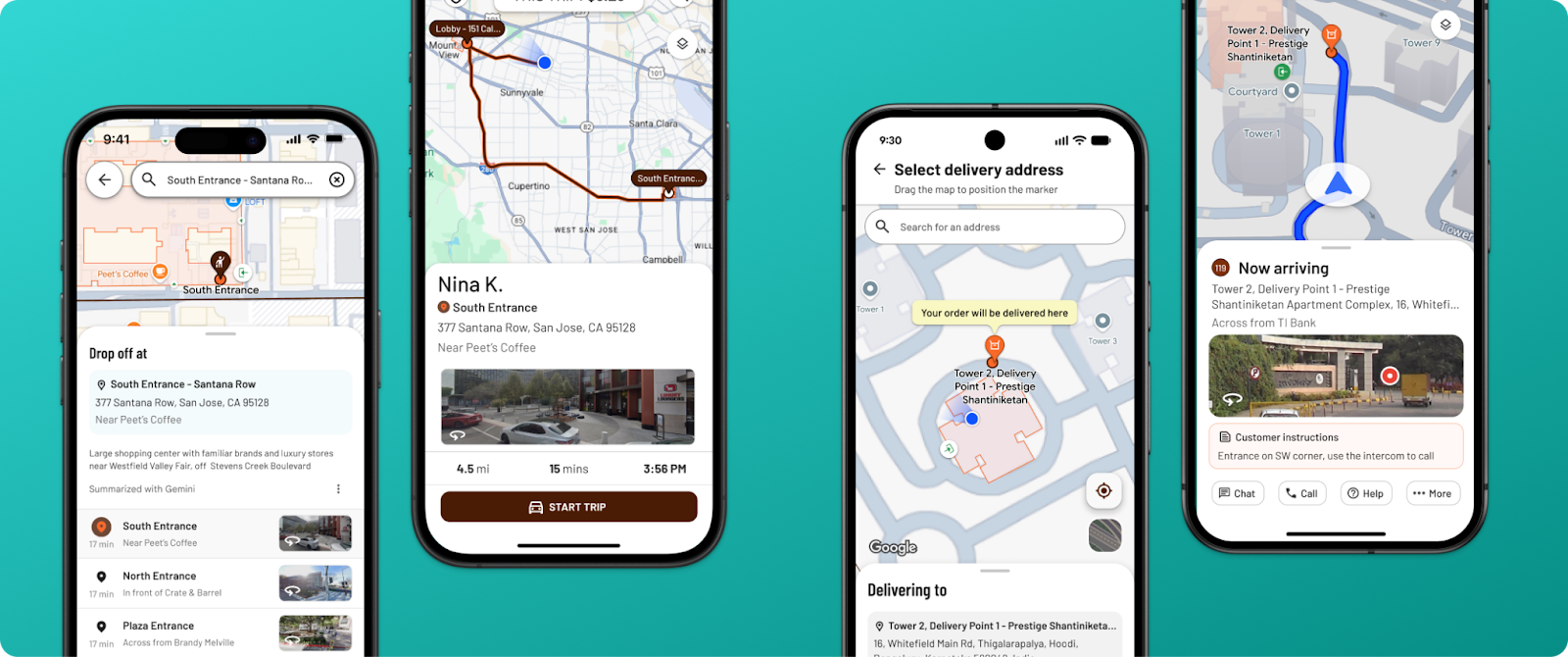
Google Maps Platform just shipped one of the most meaningful batch geocoding improvements we have seen in years. A new endpoint called Geocoding Destinations — now in Preview — changes what comes back when you convert an address into coordinates. Instead of a single pin, you now get a structured description of the destination itself: entrances, footprints, and access points.
For anyone working with location data at scale, this is worth paying attention to. Here is what changed, why it matters, and what it means for the maps you are already building.
What Google’s Geocoding Destinations Endpoint Does
For decades, geocoding has produced a single answer: one latitude, one longitude, one pin. That works for a quick driving search. It breaks down in the real world. Strip malls, campuses, warehouses, and multi-tenant buildings all have the same problem — the address is right, but the door is somewhere else.
The new endpoint returns richer, structured data for each address. A single call can now include:
- The specific building entrance
- The shape of the building footprint
- Pedestrian and vehicle access points
- The relationship of the target building to its surroundings
Google has also confirmed that annotated Street View imagery is coming to the endpoint in a future release. It is the biggest rethink of what a pin actually represents since geocoding became a commodity. You can read Google’s full announcement on the Maps Platform blog.
Why the Update Matters for Business Location Data
For consumer navigation, the benefit is obvious — fewer missed turns and fewer frustrating arrivals. The business case runs deeper. Any operation with lots of locations stands to gain:
- Delivery and logistics. Identifying the correct receiving door saves real minutes per stop. At scale, that is margin.
- Field services. Technicians arriving at hospitals, universities, or office parks know exactly which entrance they need.
- Real estate and retail. Listings feel more professional when the pin sits on the storefront instead of a parking lot.
- Multi-location and franchise operations. More accurate entrance data feeds into more accurate customer-facing ETAs.
All of this is good news. It is also, by design, a single-destination problem. Google’s new endpoint helps a user find the door. It is not built to help a business see all its doors at once.
Interactive Maps Made Easy
Sign Up NowWhat This Means for Batch Geocoding Workflows
Most operations teams do not hit the last-meter problem first. They hit the first-mile problem: a spreadsheet full of addresses — customers, leads, properties, service calls, store locations — and no fast way to understand it spatially.
- Where are our customers concentrated, and where are the gaps?
- Which regions are under-served relative to demand?
- How do our service calls cluster across a territory?
- What do our open opportunities look like on a map, grouped by status, rep, or value?
Those questions cannot be answered one address at a time. They need batch geocoding — a way to take thousands of rows and turn them into something you can actually look at.
The best batch geocoding tools still run on the same Google infrastructure that is getting smarter every quarter. Every improvement Google ships to the underlying geocoding layer flows through automatically. The destination-level precision Google is investing in now will make the pins on tomorrow’s maps more accurate than yesterday’s — with no work on your end.
How BatchGeo Turns Spreadsheets Into Living Maps
BatchGeo is built for exactly this problem. Paste a spreadsheet — CSV, Excel, or anything with an address column — and in seconds every row is geocoded, plotted on an interactive map, and ready to group, cluster, filter, and color-code by any field in your data. No API keys. No development time. No custom code.
The same Google-powered geocoding that drives the new Destinations endpoint powers BatchGeo too. You get the benefit of the platform without the engineering overhead of building on top of it. See how the batch geocoding tool works or browse customer case studies to see it in action.
The difference in scope is the point. Google is making each individual pin smarter. BatchGeo turns a spreadsheet of addresses into something a sales team, operations manager, or leadership group can actually use — a map of your business you can share, embed, or export.
The Bigger Picture
Precision at a single point and clarity across thousands of points are different problems. Google is solving the first. BatchGeo solves the second. Used together, they are complementary: the best data in the world still needs a way to be seen.
If your team is squinting at spreadsheets trying to understand where things are, the map you need is probably ten minutes away.
Frequently Asked Questions
What is batch geocoding?
Batch geocoding is the process of converting a large list of addresses into geographic coordinates — latitude and longitude — all at once, so they can be plotted on a map or analyzed spatially. A typical use case is uploading a spreadsheet of customer, lead, or store locations.
How does Google’s Geocoding Destinations endpoint work?
The Geocoding Destinations endpoint, released in Preview in February 2026, returns detailed information about a destination — including building entrances, footprints, and pedestrian and vehicle access points — rather than just a single pair of coordinates. It is part of the Geocoding API v4, which is now generally available.
Do I need to be a developer to use batch geocoding?
No. Tools like BatchGeo let you geocode spreadsheets without writing any code or managing API keys. Paste your data and get a map in minutes.
Can BatchGeo handle thousands of addresses at once?
Yes. BatchGeo was built specifically to geocode and visualize large lists — from a few hundred rows up to tens of thousands — in a single pass. See the BatchGeo plans for row limits by tier.
How accurate is batch geocoding through BatchGeo?
Accuracy depends on the underlying provider and the quality of the input addresses. BatchGeo uses Google’s geocoding infrastructure, which is updated continuously — including the new destination-level data released in 2026.
Map Your Data in Under Two Minutes
Have a spreadsheet of addresses? Drop it into BatchGeo and get an interactive, shareable map — no signup, no setup, no code.
Bring your customer list, lead pipeline, store footprint, service territory, or property portfolio. See your business on a map the way your customers already see the world.