Plan a Great Road Trip With AI
One of the best parts about road trips is how flexible they are. You can follow a clear plan, take detours on a whim, or build a route that mixes famous landmarks with hidden places you discover along the way. Today, AI tools help make it even easier to find interesting stops, compare route ideas, and uncover places you might never have searched for on your own.
Once you’ve gathered a list of potential destinations, organizing them in a spreadsheet and mapping them visually can help bring your trip into focus. This article covers planning a route with AI, cleaning your data, plotting stops on a map, refining your route, and still leaving room for surprises. After all, the real magic of a road trip often happens along the way.
Build Your Framework
Before you choose a path, set a basic framework for your trip. You can ask AI simple questions to define the details, or list what you already know. Either way, you want enough structure to generate stops that fit your travel style.
Consider outlining:
- Your starting point and destination
- Whether the trip is one way or roundtrip
- Whether you’re aiming for one specific endpoint or planning to explore for a fixed amount of time
- How many days you want to drive
- How long or how far you want to drive each day
- Any themes or priorities, such as nature, food, history, beaches, or odd roadside attractions
- Must-see places you want to include
Once you have this framework, it’s time to plan.
Plan Your Route
Head to the AI chatbot of your choice — ChatGPT, Gemini, Claude, or another tool. Ask for scenic viewpoints, small towns, historic landmarks, restaurants, or themed stops that match your interests. The key is providing enough detail to return useful ideas while still leaving room for discovery.
It may suggest familiar places, but it often reveals stops you wouldn’t find through a simple search. Treat these ideas as inspiration. Keep what fits, skip what doesn’t, and look up reviews or forums for extra context. The goal is a flexible list you can organize and refine.
Interactive Maps Made Easy
Sign Up NowHere are a few prompts to try:
- Give me ten unique stops between Denver and Moab that follow a scenic route
- Suggest interesting towns and viewpoints along Highway 1 between San Francisco and Los Angeles
- Create a loop road trip from Nashville that includes nature and historic landmarks for five days
- Plan a trip from Chicago to Minneapolis with local food, bookstores, and outdoor viewpoints
- List stops worth visiting between Portland and Glacier National Park for a seven-day drive
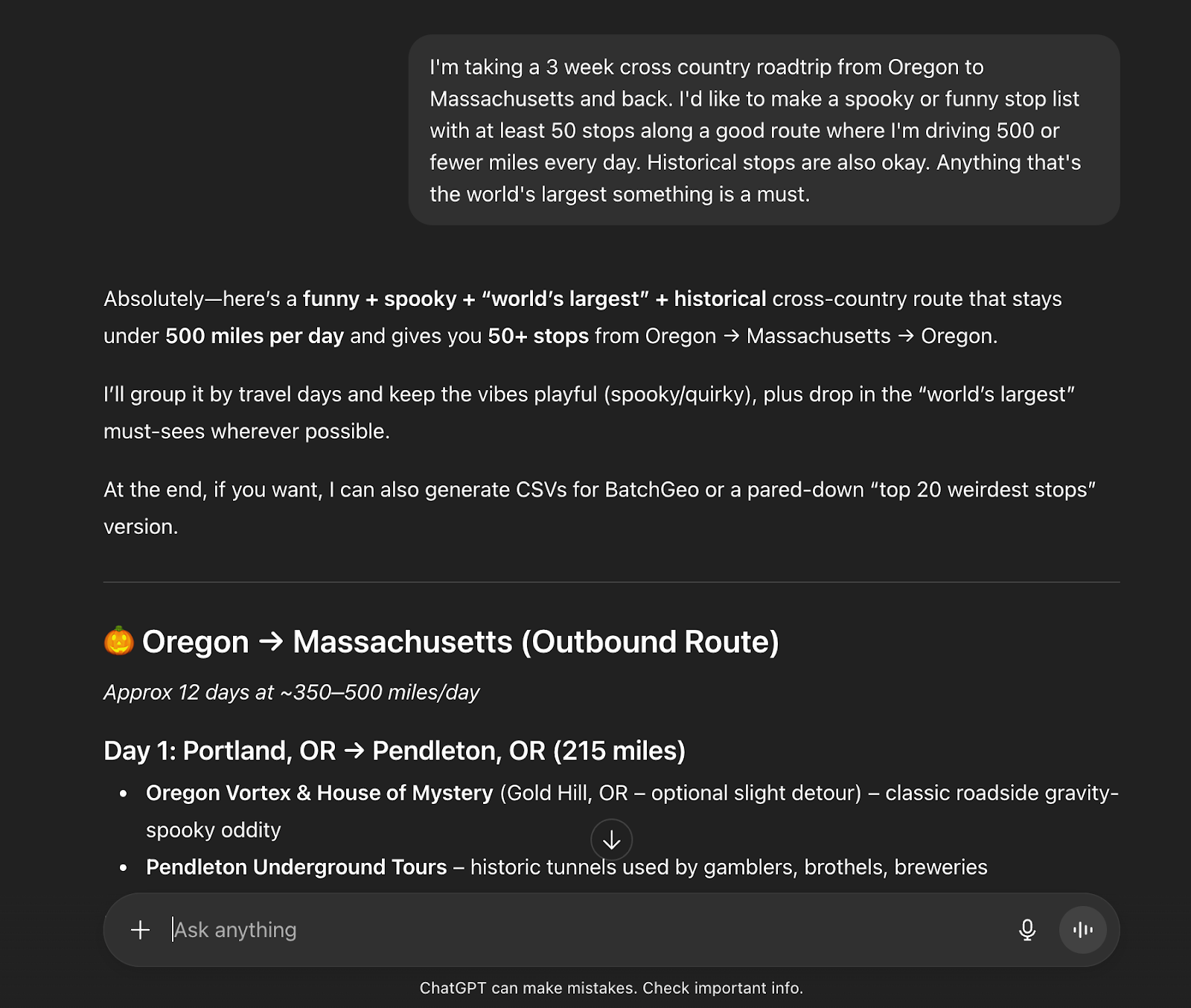
Collect, Clean, and Map Your Potential Stops
Once you have a list you like, copy the stops into a spreadsheet. Give each stop its own row, then add columns for the name, address, city, state/province and any notes you want to remember. Now is also the time to clean your data: fix formatting issues, remove duplicates, and confirm that each location actually exists and fits naturally along your route. A tidy sheet makes everything easier.
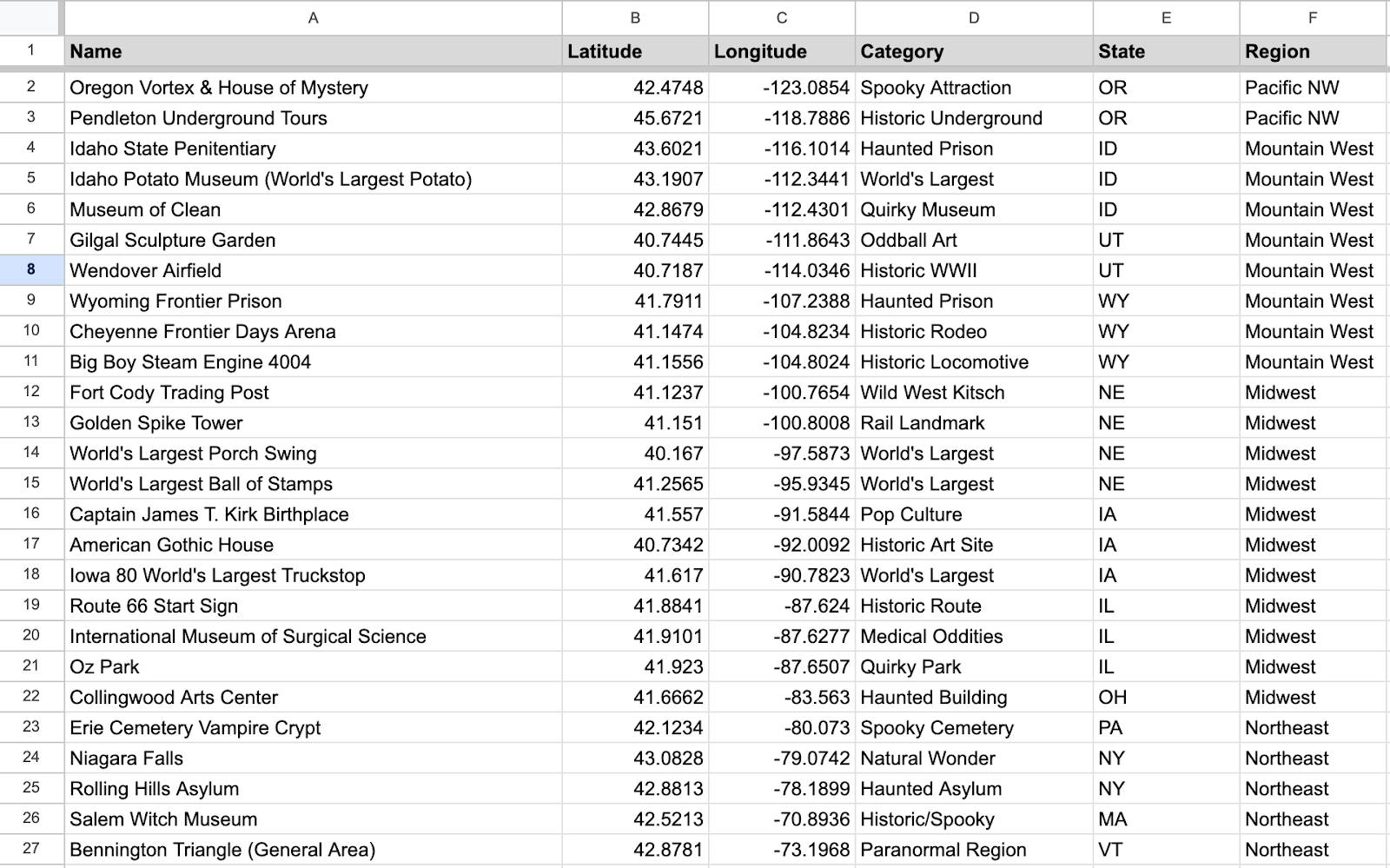
When your list looks ready, you can map it. The map will plot each stop so you can see how the trip comes together. You may notice clusters of locations, long gaps with nothing in between, or stops that sit far off your intended path. Mapping early helps you refine your route before you settle on a final plan. Here’s an example:
View Roadtrip from Oregon to Salem Massachusetts. in a full screen map
Refine Your Route on the Map
With your stops mapped, you can shape the trip into something realistic. Look for places that are too far off course, clusters that make sense to group in a single day, or long stretches where you may want a break. Reorder stops, remove anything unnecessary, and highlight the ones you’re most excited about. The goal isn’t to plan every minute, but to create a route that balances structure with the freedom to explore when something unexpected catches your eye.
Create Your Own Map
A great road trip mixes planning with room to explore. AI helps you gather ideas, and mapping brings the route into focus, but the best moments often come from unplanned detours. Use your map as a guide to the highlights that matter most.
You don’t have to take a road trip to use BatchGeo. Whether you’re mapping customer addresses, business locations, delivery routes, or any list in a spreadsheet, BatchGeo makes it fast and simple to create a custom map. If you’re not sure where to start, sample data is available. Paste your spreadsheet, build a map, and discover the patterns in your data.