Map publishers with hundreds of markers – new tool
UPDATE: I have increased the number of points to trigger this feature from 100 to 500.
Publishing a map with hundreds or even thousands of markers can be problematic. Your maps may look like they are drowning in a sea of markers. Yesterday we rolled out a new feature that will help publishers with this problem.
Maps containing over 300 points with no groups assigned will have marker clustering enabled. This feature is thanks to the Google Maps Utility library. Below is an example.
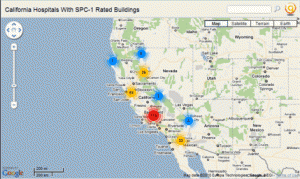
Please post feedback on this feature here. I am still trying to sort out when is the appropriate time to have this feature turn on. I would rather not have to make it a toggle as I am interested in keeping things as simple as possible from an end user standpoint.
Thanks!


Comments
Dislike this feature without any way to turn it off. The markers are way to big and group 2+ map points in close proximity. Go back to the old way or have a seperate option for grouping please!
Hi,
I discovered this feature yesterday, while testing batchgeo with larger input files, and it`s simply COOL!
First you think “oh, what’s this?”, but it’s self-explaining and I don’t think there’s a need for a toggle switch, not really.
In any case, Thank you for providing and further improving this very useful tool!
Yours, Sabine
I am planning on using maps to highlight sales opportunities. The original markers, even when very dense, are preferable for me. On the other side of the coin, I can understand those who feel otherwise. While appreciating not making everything toggles, I would really rather have the flexibility to present the information either way at my discretion.
Update – I increased the number of points to 500 before the marker clusters will show up.
This seems like a great feature but what I’m really interested in is changing/selecting the pin colors before/after I create my map. Is that option coming soon?
My son is looking at mapping a cemetery. Do you think batchgeo will work? There are no addresses, but we can get GPS coordinates for all the plots.
Thanks
Rich
I agree that I don’t like this feature without a way to turn it off. We are using the maps to place a media buy, and need to know exactly where 1000+ store locations are on a map. I can see this new feature being handy in some ways, but annoying in others. Please switch it back!
This is a cool feature, I like it. I need to do a map with 15,000 people, is there any way to do this, even if it aggregated them into these larger markers only to give us a good distribution across the country.
Thanks.
PHil Jarvis
Katie – Can you email me an example of your map? pholmstr at gmail
I’m using Batchgeo for similar tasks as Don Bridge and think the grouping tool is extremely useful. For the people who are complaining it groups too many people together, I would suggest looking at smaller areas or just zooming in further. I can understand the request for a toggle switch, however, I think its fine the way it is. Thank you very much for the new feature and the site in general!
Is there a way you could decrease the number to like 200 before the feature turns on? Or the toggle option I guess because I would like to use the feature but am not always mapping 500 points at a time.
I am trying to geocode and get markers on my results. I tried it with 23 entries and the markers come out as just orange dots, I did it before an dit had markers (ABC….)
Now I cannot get any of the markers to show up… HELP
Hey there! I’m looking at implementing this for an in-office solution; not for external viewing exactly. We have over 5,000 clients that fall into one of two categories. I saw the “group” feature mentioned a couple times but I don’t know how to implement it. How do I do this?
Thanks so much! AWESOME tool!!!
John
I want to mark churches in GA for a marketing opp. But I can’t seem to get batchgeo to process more than 45 lines. The total is about 225 for GA, and I would like separate “points”. Can this be done?
Great tool. We used to have a Frappr map till they shutdown… I know you would like to keep it simple but it would be nice to have some way to turn grouping off. I would like about 3300 individual pins.
Keep up the great work!
I think with 1000+ markers you really need the clustering or else the map is just way too slow. I made it so if you use a “group” column the clustering will be disabled, so you can always turn it off that way.
Also I changed it now to 300 markers before it turns on.
Great feature to implement by default, but a toggle option would still be good. Definitely helpful for 500+ points. I wouldn’t even mind being able to turn it on if I have 200 points, but it should be a toggle available when editing or creating a map.
You are right about how slow it is with that many points!
Hi! That feature was amazing! Please put a toggle. There are situation when it’s cool also with 100 points and situation when you don’t want it also for 1000+ points. But it’s a cool option! Make a toogle!!
I dislike the feature. It needs a toggle
I love this feature, but I hate it without toggle.
An example of where it can be bad is if you have a duplicate record; no matter how far you zoom in… the point will not display itself and therefore cannot be identified.
Also, if the geo-code accuracy is zip code, you have several points in the same place; they will never be revealed as points either.
I agree with Brian. I like the idea, but with more than one customer at the same address, I cant click on it to see who is there. It will continue to display the number of records at that location.
I noticed you made the change to allow toggle on/off in the advanced options. Thank you so much! Where do I donate
Alright all I have enabled a toggle for marker clustering now under the Advanced Options. It will still be turned on by default if you have 300 markers or more but you can turn it off.
I use BatchGeo for elaboret studies of maps of criminal situation.
The hotspot is a wonderfull gear of my job, because explicit (in clean form) aglomerad of criminal cases.
Thank’s for your job
Marco
I really like this option….it is simply amazing. However, I agree with few of Batchgeo’s users….it should have an on and off button to switch between cluster view to normal view.
Thanks once again for sharing this amazing tool with us.
Ed
An option as been added to the “Advanced options” section for enabling / disabling this feature.
this is the best map product i’ve seen. I love it. but…, what i would REALLY love is a way to put the address ON the map with the markers, maybe a small balloon type marker. (with the distances) I’m sorry, i’m not really an ingrate, but you seem to work miracles with this.
Great Options, but it would be nice if we could choose the number of point on a same place for the cluster. For example, I have 7 points at the same place, it would be great if it shows a big point with “7″ inside !
Thanks again for you amazing work !
Fab
The tool is great.
I love your tool. However, when I enbable “clustering” and “Group By” with a set of 4400 markers, it doesn’t seem to do the clustering, it just seems to load all the markers and then slows to a crawl. Not sure if these two features are incompatible or if it’s a bug. I’ve tried in Firefox and Google Chrome. Also, I’d reeeeeally like to be able to specify a custom marker instead of a custom image. I’m trying to use clustering with the “Group By” feature to show a national map of distributors for some retail chains, color coded by distributor name. Works great with smaller data sets that don’t need clustering, but not so great with the larger sets. The tool is still awesome though. Kudos!
Brett – currently we are disabling clustering when using the group feature. Don’t use the group feature and the cluster feature will work well for 4400 markers.
Hi,
I find Batchgeo a great tool, but I do not like the automatic clustering.
I use grouping, but I still have the clustering on.
However this is not what I want. Is there a way to turn it off ? I do not find a toggle buttom to disable it.
Thanks
Sofie
Hi, we have a map with 2 groups and about 1400 data points. Until 2 day’s ago, the data points are plotted individual, but today they are clustered.
Did you change the code, to enable custering when using groups?
I read in the blog that you can enabling / disabling this feature in the “Advanced options” section. I found it back in the “english” version, but in the dutch version (http://www.batchgeo.com/nl/) the option is not available.
We love your tool, great work !!!
Hi Johan -
I added the option to the dutch version so you will have control over the clustering like the english version.
Let me know if the translation for the option description doesn’t look good, I can change it. Thanks!
Sofie – this option is available in the english version, which version are you using I can add it there.
@Admin: Well done, translation is clear.
Hi – great software and service!! Is it possible to have shaded markers depending oon a value of say 1 to 10, pls? Thx for this great tool. Robert
Hi, I did a map of galleries in London recently and disabled the clustering tool when making it. I since have gone to my map via the email link which at first was fine but a few weeks later seems to now have been clustered. This means that when I look at the various groups they are no longer clearly identifiable. How can I turn the clustering off?
Would really love a reply as I want some students to use the map…..Thanks lots – I really appreciate the wonderful mapping tool you have made! Soraya
Soraya -
You should be able to control the clustering option from the edit screen. Let me know if you continue to have trouble.
Hi, Is there any way to change the marker image to the custom one?
My client want me to include their logo image as a marker instead of the built in marker image.
Like this new feature, however, do you have a solution for mapping several pieces of data for a single point? An example is a crime map I am trying to build. There are five crimes around a single address. Each one is a different entry in my .CSV spreadsheet. These clusters work, but if you have several pieces of data for a single location, you can’t see each one.
Is there a solution for this? Has anyone found a way around this problem?
I have also tried this in Google My Maps, and it will not display multiple data at a single point. Strangely, although they allow for this function in their Picasa maps, Google does not have it for their My Maps feature.
Any help is appreciated. Thanks!
I can’t seem to find where exactly I can turn off the clustering. I like the clustering but when drilling down into the map the specific markers don’t appear, just the cluster dot and the number.
I also can’t find out how to turn off clustering. Our map uses groups and the clustering breaks the groupings.
Hi again,
I wrote to you on September 8, 2010 at 1:00 pm about trying to switch off the clustering tool – which automatically applied itself to my maps. You said I should use the edit tool. I tried to by following the link to where I can edit my map – but once in there in the Validate section I found that the clustering function wasn’t switched on and yet the markers had been clustered. I;ve tried switching it on and then off but it still clusters….any pointers?
Thanks enormously, Soraya
How can I get more than 6 different markers to appaer at one time on my map? I have 30+ different routes, and I would like each route as a separate marker, preferrable all the same color, with a number, based on the group column, inside the marker?
I also am looking for a simple way to map crimes and find MapGeo overwrites or uses just the latest incident on a list to display for a given location. I would like to have multiple points displayed for a single location, or some way to indicate that there were two or more incidents that occurred at a single address. Perhaps smaller, offset icons could be used when there are more than one incident at a location.
BatcvhGeo is super and a marvelous application for those of us who don’t have the funds or expertise for the big boy programs like ESRI.
Is it possible to put a marker to what the name is. All my store’s have a store number and I would like to use this feature for up to 200 stores at a time. Any thought on this happening in the future? Regardless, this is a great tool and really appreciate all you have done to make it work better.
I want to switch off the clustering tool – which automatically applied itself to my map. The Validate section indicated that the clustering function wasn’t switched on and yet the markers had been clustered. How do I turn clustering off so the map looks like it did when I first used the site last September when none of the sites were clustered
Hi – the option to disable it is on the edit screen. If you need to retrieve the edit screen URL you can use this tool: http://batchgeo.com/help/